Complete Checkout
Process sales, returns, exchanges, discounts, customer payments, store credit, and fulfillment from one retail interface.
MTPOS for iPad · Full retail operations
Run checkout, inventory, purchasing, cash registers, customer accounts, reporting, and multi-location retail from an iPad. Use the same MTPOS platform on Windows, Android, iPhone, and supported browsers when another device fits the task better.
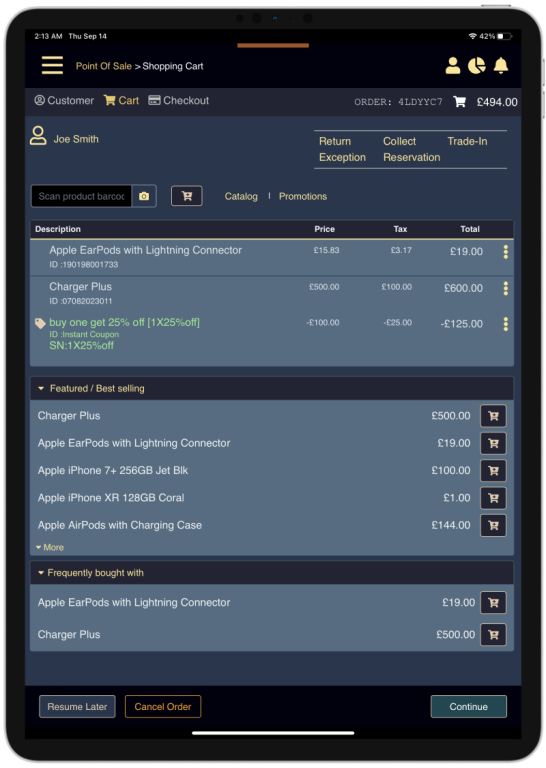
More than tablet checkout
Some iPad POS products are designed mainly for simple sales. MTPOS brings the wider retail operation to the iPad, so stores can manage what happens before, during, and after checkout.
Process sales, returns, exchanges, discounts, customer payments, store credit, and fulfillment from one retail interface.
Manage purchasing, receiving, replenishment, transfers, cycle counts, reservations, serialized items, and stock locations.
Control register opening, closing, counts, pickups, deposits, payment methods, refund permissions, and daily review.
Use iPads where mobility matters and add supported Windows, Android, iPhone, browser, or fixed-terminal workflows where appropriate.
Real software for real store work
MTPOS connects the customer-facing sale with inventory, cash control, payments, and store operations. These are production workflows, not simplified demonstration screens.

Full inventory management
MTPOS inventory management connects the sale with purchasing, receiving, replenishment, transfers, counts, reservations, returns, and item-level control. Store teams can act on inventory from the same platform that records demand, while managers keep visibility across locations.
Create purchase orders, follow incoming stock, and receive full or partial deliveries into the correct location.
Move stock between stores, warehouses, stockrooms, shelves, and bins while preserving movement history.
Run partial cycle counts and reconcile differences without closing the entire store for a full physical inventory.
Maintain item-level identity and history when serial numbers, warranty, activation, repair, or return workflows matter.
Connect reservations, pickup, order fulfillment, returns, and RMA work to available inventory.
Give authorized teams a shared view of stock, exceptions, open work, and inventory pressure across the operation.
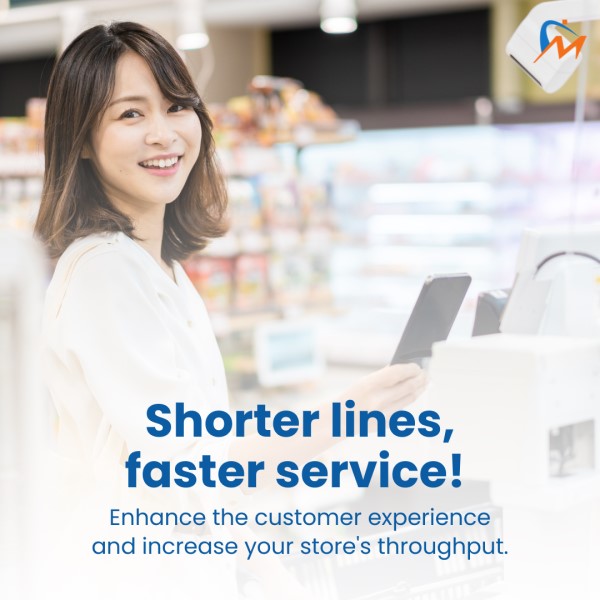
Use an iPad on the sales floor, at a counter, at an event, or during supported on-site selling without separating mobile activity from the store operation.
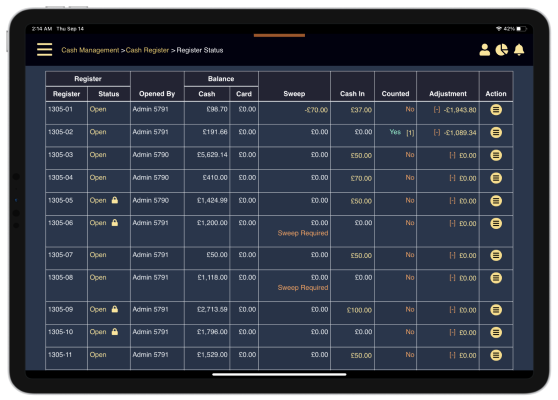
Manage register state, cash counts, pickups, deposits, adjustments, and payment controls with the permissions your operation requires.

Connected customer care
When a customer needs help after checkout, teams can work with customer and order context instead of starting from an isolated support record. MicroTelecom Help Desk adds ownership, ticket history, queue visibility, alerts, and service reporting to the wider customer relationship.
Full retail capability on iPad
Start with the functions your store needs now. Add users, devices, registers, locations, ecommerce, and specialized workflows without replacing the core POS platform.
Start with today’s store
Begin with iPad checkout and the workflows your team needs now. MTPOS gives you room to add inventory control, purchasing, additional devices, ecommerce, and more locations as the operation grows.
Add purchasing, receiving, transfers, replenishment, cycle counts, serialized items, reservations, returns, and location-level stock control.
Use iPads for mobile selling and supported Windows, Android, iPhone, browser, or fixed-terminal workflows where the task or hardware requires them.
Add employees, registers, stores, centralized catalogs, customer programs, ecommerce, fulfillment, and management reporting without starting over.
iPad without device lock-in
An iPad can be the primary register, a mobile selling device, or a manager’s remote work tool. The wider store can still use supported Windows terminals, Android devices, iPhones, and browser workflows according to the role, location, peripherals, and selected deployment.
Confirm compatibility for payment terminals, printers, scanners, cash drawers, scales, and other hardware required by your intended store configuration.
View MTPOS on the Apple App StoreRetail and service environments
The same MTPOS foundation can support different catalogs, checkout styles, inventory rules, customer services, and hardware requirements.
Choose the right starting point
The right configuration depends on store count, inventory complexity, peripherals, payment requirements, and the workflows each employee must perform.
Start with iPad checkout, products, inventory, customers, users, and the hardware needed for daily sales.
Start a Free TrialAdd centralized catalogs, purchasing, transfers, employee controls, reporting, ecommerce, and fulfillment.
Compare MTPOS OptionsPlan mixed-device fleets, catalog control, custom integrations, regional requirements, phased rollout, and long-term support.
Discuss Your RequirementsQuestions before you choose
Confirm device, hardware, payment, connectivity, and deployment requirements for your intended store configuration before rollout.
Ask About Your StoreMTPOS is available for iPad through the Apple App Store and requires an active MicroTelecom account. Supported browser and device options may also be used according to the selected configuration.
No. MTPOS is designed to give authorized users access to broader retail workflows such as inventory, purchasing, transfers, counts, customer history, reporting, and store management. Available functions depend on the user’s permissions and selected configuration.
Yes. A store can combine supported iPad, iPhone, Android, Windows, and browser workflows. The right device depends on the task, peripherals, operating system, and deployment.
MTPOS connects checkout with inventory. Available capabilities can include stock levels, purchasing, receiving, transfers, cycle counts, serialized inventory, item locations, reservations, and mobile scanning.
Yes. MTPOS can support multiple registers and locations with centralized product, customer, inventory, purchasing, transfer, employee, and reporting workflows according to the selected configuration.
Compatibility depends on the specific hardware, operating system, connection method, payment processor, country, and deployment. Confirm every required peripheral with MicroTelecom before purchase or rollout.
Evaluate the real product
Start with a trial or discuss hardware, payments, multiple locations, integration, or enterprise deployment with MicroTelecom.