Thrift Store POS Software for One-of-a-Kind Inventory, New Arrivals and Fast-Moving Finds
MTPOS helps thrift retailers manage unique merchandise, mixed categories, frequent product intake, pricing, inventory, customer programs, secure payments and multi-store operations from one cloud retail platform.
Managing one-of-a-kind inventory as it arrives and sells
Many products are truly one of a kind
Organize unique apparel, furniture, books, housewares, collectibles and accessories without forcing every item into a repetitive catalog model.
New merchandise arrives continuously
Support frequent catalog and inventory updates as new items reach the sales floor.
Price, condition and category drive the decision
Use store-defined attributes and pricing workflows to keep highly varied merchandise understandable and sellable.
Trusted by Enterprises Worldwide
Practical retail infrastructure for independent thrift stores and growing resale groups
MTPOS connects secure checkout with catalog management, inventory, promotions, customer programs, mobile selling, eCommerce and multi-location operations.
Keep a constantly changing assortment organized without making the store feel generic
Thrift customers enjoy discovery, but employees still need clear product details, reliable prices and fast checkout. MTPOS helps bring structure to a highly varied, one-of-a-kind assortment.
Category, Style and Condition
Use store-defined attributes to describe what the item is, how it looks and what condition it is in.
Keep Unique Pieces Distinct
Give each item the right price and enough information to be recognized quickly on the sales floor.
Move New Arrivals Into View
Keep newly added merchandise visible and organized as the assortment changes from day to day.
Rewards, Gift Cards and Store Credit
Support repeat visits and future treasure hunts with configured customer programs.
Bring structure to merchandise that rarely arrives in neat, repeatable batches
Organize apparel, furniture, books, housewares, décor, collectibles, electronics and accessories using categories and store-defined product details.
Mixed Categories
Maintain a broad resale catalog without forcing unrelated product types into the same structure.
Condition and Style Attributes
Configure useful details such as condition, size, material, era, color, style and other store-defined attributes.
Unique and Repeatable Products
Manage one-off pieces alongside recurring categories such as books, media, accessories and household basics.
Images and Descriptions
Keep visual and descriptive information available for distinctive items and selected online listings.
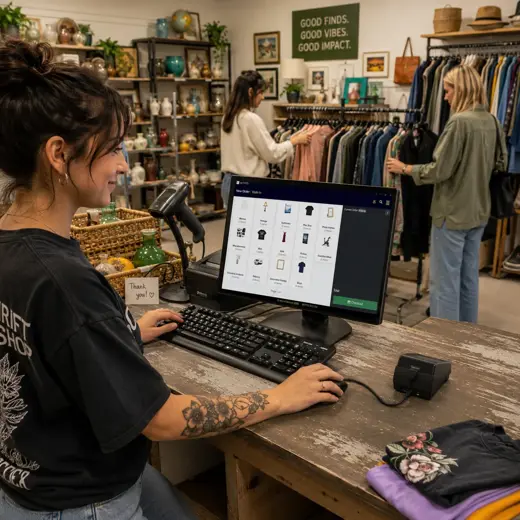
Know what is still available when every distinctive item may have only one chance to sell
Thrift inventory changes quickly and often includes low quantities of highly varied merchandise. MTPOS helps keep stock, counts and transfers connected to the broader retail operation.
- ✓ Manage one-of-a-kind and low-quantity merchandise
- ✓ Maintain inventory across mixed categories
- ✓ Perform cycle counts and inventory audits
- ✓ Transfer products between stores and locations
- ✓ Review inventory activity through reporting
- ✓ Keep selected online listings connected to store operations
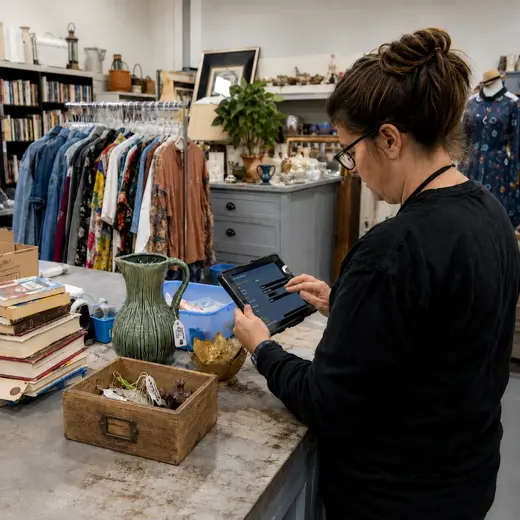
Keep merchandise moving without losing control of how and when prices change
Use configured promotions and pricing workflows to support category offers, seasonal clearances, color-tag events and other store-defined markdown strategies.
Exact promotion and markdown behavior depends on the selected MTPOS plan and store configuration.
Category Promotions
Create configured offers around apparel, furniture, books, housewares or other store categories.
Seasonal Clearances
Support store-defined events that help make room for changing seasonal inventory.
Featured Finds
Highlight new arrivals, distinctive pieces and merchandise the store wants staff to present first.
Customer Rewards
Encourage shoppers to return frequently as the assortment changes.
Move from intake to sales floor, discovery, checkout and the next customer visit
Describe the Item
Assign the category, condition, size, material, style and other useful store-defined details.
Set the Price
Give the individual item the appropriate price and make the selling information clear.
Move It to the Floor
Place the item in the right department and keep inventory status connected to the store operation.
Help the Customer Discover
Check product details, price and availability while the customer explores the store.
Complete the Sale
Apply eligible promotions, process payment and connect the transaction to customer programs and reporting.
MTPOS supports the retail workflow shown here but does not claim a dedicated donation, charitable-receipt or consignment-payout system.
Give shoppers another reason to return when tomorrow's assortment will be different
Thrift retail thrives on repeat visits and the possibility of finding something unexpected. MTPOS keeps customer programs connected to the retail workflow.
Customer Rewards
Encourage shoppers to return often as new merchandise reaches the floor.
Gift Cards
Give customers a flexible option when the recipient should choose their own one-of-a-kind find.
Store Credit
Support configured return and customer-service workflows while keeping value connected to a future purchase.
Reservations
Hold eligible distinctive items when the selected plan and store configuration support reservations.
Available capabilities depend on the selected MTPOS plan and store configuration.
Keep mixed baskets moving even when every item looks different
MTPOS connects supported payment processing to the wider thrift retail workflow, from a quick book purchase to a basket containing apparel, housewares and furniture.
Card and Contactless Payments
Accept supported credit cards, debit cards, EMV, tap, swipe and contactless mobile payments.
PCI-Compliant Processing
Use PCI-compliant payment processing with end-to-end encryption through supported integrations.
Flexible Payment Methods
Support cash, cards, wire, PayPal, Stripe, checks and other configured payment methods.
Refund Method Controls
Define which refund methods may be used according to the original payment method and store policy.
Payment capabilities depend on the selected integrations, plan and configuration.
Bring product tools into the aisle and extend selected finds beyond the store
Give employees more flexibility while processing new merchandise, checking items on the floor and presenting selected products online.
Mobile POS
Check product details, price and availability away from the fixed checkout counter.
Online Store
Extend selected distinctive items online while keeping store inventory connected to the MTPOS platform.
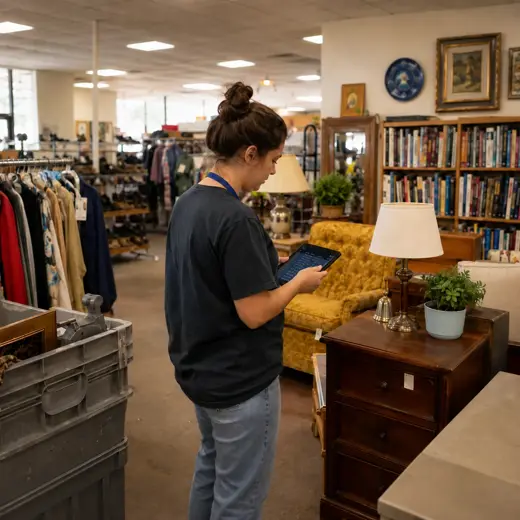
One platform for the sales floor and the operation behind it
Point of Sale
Process mixed baskets of apparel, furniture, books, collectibles, housewares and accessories.
Inventory
Manage one-of-a-kind and low-quantity merchandise across a broad range of categories.
Catalog and Product Attributes
Organize condition, size, material, style, era and other store-defined product details.
Advanced Promotions
Create configured offers around categories, seasons, clearances and featured merchandise.
Customer Programs
Use rewards, store credit and gift cards to support repeat shopping.
Reservations
Hold eligible distinctive items when the selected plan and store configuration support reservations.
Multiple Stores and Transfers
Coordinate product movement and availability across stores and other configured locations.
Mobile POS
Check products, prices and availability while working away from the fixed counter.
eCommerce
Extend selected one-of-a-kind items online while keeping store operations connected.
Data Import
Accelerate catalog and operational onboarding through supported data-import capabilities.
Cash and Store Management
Manage configured registers, safes, bank deposits, business expenses and daily cash activity.
Secure Payments
Connect supported card and other configured payment methods to the wider retail workflow.
Available capabilities depend on the selected MTPOS plan, integrations and store configuration.
Expand without losing control of unique merchandise, store identity or daily operations
Start with one location and expand to more users, registers and stores while maintaining centralized catalog, inventory, payment and customer control.
For larger rollouts, custom requirements or private-cloud deployment, MicroTelecom also provides an enterprise path.
Choose the Right MTPOS Edition
Match your thrift operation with the required level of promotions, customer programs, registers, online selling and multi-store control.
Questions Thrift Retailers Ask Before Choosing a POS
Connect one-of-a-kind merchandise, frequent new arrivals and fast checkout in one platform
Use MTPOS to manage unique products, inventory, pricing, promotions, customer programs, payments and store growth from one cloud retail platform.